N9BI Testing Center
YOUR instruction page is here
Please read instructions carefully, do not close this page! Link to join Zoom Session is at the end of the page! YOU NEED TO INSTALL ZOOM WORKPLACE.
IMPORTANT: Do not join Zoom until there are five minutes remaining before your exam, or until the Team invites you to do so.

Exam day is here
Thanks for Choosing the N9BI – ARRL Testing Team
as Part of Your Amateur Radio Journey!
You’ve Got This! 💪
Welcome to our trusted, efficient, and friendly method for administering Amateur Radio examinations! The N9BI Testing Team (www.n9bi.com) is proud to serve you offering professional, convenient testing in both English and Spanish. We’re excited to meet you and help you take this important step in your Amateur Radio journey!
N9BI Remote Testing Center – Cancellation & Rescheduling Policy
To ensure fair scheduling and efficient use of our volunteer examiners’ time, the following policy applies to all exam appointments:
Cancellation Policy
- Applicants may cancel their exam appointment up to 3 calendar days (72 hours) before the scheduled exam date.
- Eligible cancellations will receive a refund of the application fee minus any non-refundable payment processing/transaction fees charged by the payment processor.
- Cancellations received less than 3 days before the scheduled exam are not eligible for a refund.
Rescheduling Policy
- Each applicant is permitted one (1) complimentary reschedule of their exam appointment.
- If an applicant needs to reschedule a second time, a new application fee must be submitted using the payment link provided in the original registration email.
- No exceptions will be made to this policy unless approved in advance.
Special Circumstances
Requests involving exceptional or unusual circumstances will be reviewed on a case-by-case basis. Any exception must be approved by the N9BI Session Manager.
For questions or to request consideration of a special circumstance, please contact sancho@n9bi.com before your scheduled exam date.
By registering for an exam with the N9BI Remote Testing Center, applicants acknowledge that they have read and agree to this Cancellation & Rescheduling Policy.
Special Needs or Requests?
Our team understands that every applicant is unique. If you have any special needs or requests, we are happy to offer reasonable accommodations to help you succeed, including support for sight-impaired applicants. Please reach out before your exam so we can ensure everything is ready for you.
Final Reminders Before Joining Your Session
Following these steps will make your exam experience smooth and stress-free:
- Please join today’s session on two devices — a computer and a phone are most common. If possible, join with your phone first.
- Have your government-issued photo ID ready — we’ll need it shortly.
- We have your 4-digit PIN — set that paperwork aside for now.
- Clear your workspace — remove extra papers, posters, or files.
- Silence your phone and keep it out of reach once the exam begins.
- No physical calculators may be used, but you may use an on-screen calculator.
- Close all unnecessary programs: Email, VNC, TeamViewer, Microsoft Teams, Discord, Steam, Messaging, etc.
- You should have only three applications running: Web Browser, Zoom, and Calculator (if desired).
- Please remove headsets, earbuds, smart glasses, and smart watches.
- Disable any Zoom virtual backgrounds or blur effects.
- Turn off or cover any extra monitors/TVs visible to your camera.
- Most well-prepared candidates finish in 13–18 minutes — but remember, your exam is never timed!
- Grab a drink, take a deep breath, and relax — you’ve got this!
- And remember: it’s perfectly okay to feel nervous! Think of this as just another practice test — we’re here to help you succeed!
When you join the meeting, you may see the message “Host Will Be With You Soon.” Please be patient — we see you and will begin your exam shortly. While waiting, enjoy the video on screen for final tips and encouragement.
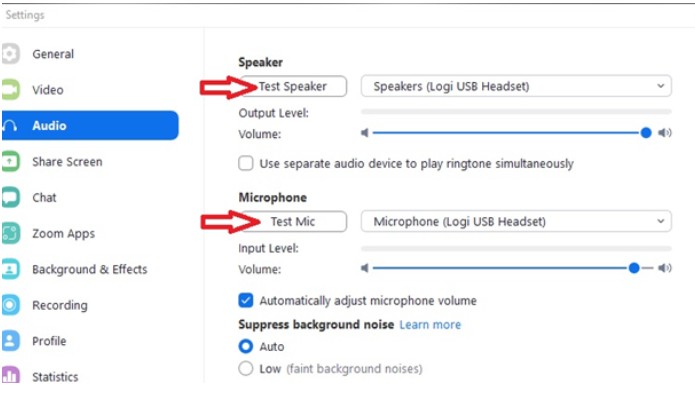
This is a great time to test your Zoom audio and microphone: At the bottom of your Zoom window, click “Test Computer Audio” → “Test Speaker and Mic.” Make sure you can hear Zoom — and Zoom can hear you!

Thank you for trusting our Team N9BI